A warehouse system built around your floor.
Receiving through to dispatch, directed on a handheld and recorded once — configured to your layout, your rules, and the systems around it.
Every step above writes a stock movement against the same record, so the floor, the office, and the reporting read the same figure.
01
OverviewEvery movement directed, and recorded once.
A warehouse management system exists to answer two questions at any moment: what is on hand, and where is it. Everything else follows from keeping those answers true as goods move.
Northpoint’s WMS records each movement at the point it happens, on a handheld in the aisle rather than on a form filled in afterwards. The same record that confirms a put-away updates the stock figure, the order status, and the reporting, so there is nothing to reconcile at the end of the day.
The workflows are configured around your operation — your locations, your storage rules, your pick sequence — rather than fixed by the software. Where your other systems can exchange data, orders and stock stay aligned with them.
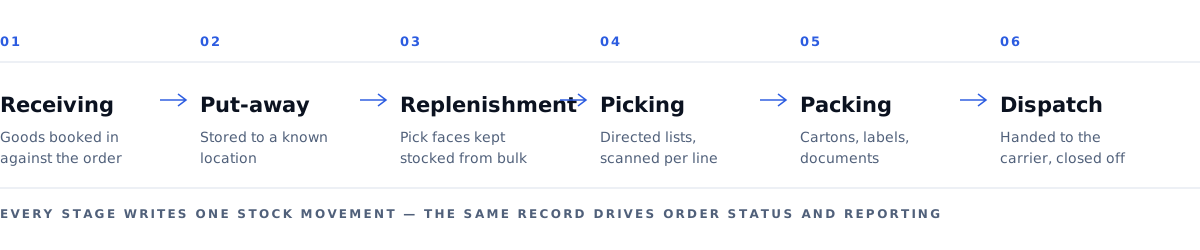
- Receiving — goods booked in against what was expected.
- Put-away — stored to a known location, confirmed by scan.
- Replenishment — pick faces kept stocked from bulk.
- Picking — directed lists, scanned line by line.
- Packing — cartons, labels, and documents produced at the bench.
- Dispatch — consignment handed over and closed off.
02
Receiving to dispatchWhat happens at each stage.
In plain terms, and in the order it happens on the floor.
Receiving
Goods arriving at the dock are booked in against the purchase order or advice note that was expected. Quantities are counted and confirmed on a handheld, and anything short, damaged, or unexpected is recorded as it is found rather than reported later.
Put-away
The system proposes where the goods should go, based on the rules set up for your racking — item, size, temperature, or whatever your storage actually turns on. The operator scans the location to confirm what was done.
Replenishment
Pick faces are topped up from bulk storage before they run out, on rules that watch the quantity at the face against the demand coming through.
Picking
Orders are released as lists or waves, and each line is directed to a location and scanned to confirm the right item and quantity. Short picks raise an exception for a supervisor instead of being left for dispatch to notice.
Packing
Picked items are packed and confirmed, with cartons, labels, and any paperwork the customer or carrier requires produced at the bench.
Dispatch
Consignments are built, handed to the carrier or loaded, and closed off. Where the carrier supports it, delivery status is returned against the order.
03
CapabilitiesWhat the system handles.
Configured to your specification during implementation.
Receiving & put-away
Inbound checks, quality holds, and directed put-away against your storage rules.
Directed picking
Pick paths, wave and batch picking, and scan confirmation per line.
Packing & dispatch
Carton logic, labelling, documentation, and carrier hand-off.
Slotting & replenishment
Rules that keep fast movers reachable and pick faces stocked.
Mobile scanning
Handheld operation for every stock move on the floor.
Dashboards
Throughput, workload, and open exceptions on live records.
04
InterfaceWhat a supervisor screen looks like.
A pick queue is the screen most operations live in: what is released, how far through it is, and what needs a decision.
| Order | Lines | Zone | Status | Released |
|---|---|---|---|---|
| SO-40118 | 12 of 12 | A | Ready to pack | 18 min |
| SO-40119 | 7 of 9 | A | Picking | 11 min |
| SO-40120 | 3 of 8 | B | Short pick — needs review | 24 min |
| SO-40121 | 0 of 15 | C | Awaiting replenishment | 6 min |
| SO-40122 | 5 of 5 | B | Packed | 32 min |
Layout, fields, and rules are defined with you during design. This example is drawn to explain the idea of a queue with exceptions surfaced in it, not to show a delivered screen.
05
Bringing it liveHow the system reaches your operation.
Five pieces of work, each with something it depends on from your side. What is included, and in what order, is set out in the agreed scope.
Configuration
Locations, item data, users, and the rules behind put-away, replenishment, and picking are set up to match your operation. Most of what makes the system fit your floor is configuration rather than code.
Integrations
Interfaces are built for the information that has to cross between systems — orders in, stock aligned, accounting information out, shipment updates back.
Data migration
Items, locations, and opening stock are loaded, validated, and checked against what is physically there before anyone relies on them.
Training
Floor and office users are trained on the workflows they will actually use, on your own data rather than a demonstration set.
Go-live
A cut-over is planned with you — what runs in which system on the day, what is counted beforehand, who to call, and how to fall back if something needs attention.
We do not promise a specific accuracy figure or a deployment without disruption. Replacing the system a warehouse runs on affects the floor, and results depend on your data, your hardware, and how the cut-over is planned together. What we commit to is a plan you have reviewed and people available when it happens.
06
EnvironmentBuilt to fit your environment.
Cloud or on-premise
Deployed on cloud infrastructure or your own servers, decided with you before build.
Interfaces
Defined interfaces to the systems your business already runs, subject to what those systems expose.
Hardware
Works with barcode scanners, label printers, and mobile devices; compatibility is confirmed against your specific models.
Access control
Role-based permissions and audit trails over stock movements and changes.
07
Related08
Get in touchStart a project.
Describe how the warehouse runs today and what the system has to fit around. We reply by email with how it would apply and what it depends on.